Table of Contents
- Introduction
- What a Faceless Channel Actually Is
- Step 1: Pick a Niche With RPM in Mind
- Step 2: Set Up the Channel Properly
- Step 3: Choose a Content Format That Needs No Face
- Step 4: Write Scripts That Keep People Watching
- Step 5: Build a Lean Production Toolkit
- Step 6: Create Your First Three Videos
- Step 7: Set a Cadence You Can Actually Keep
- Step 8: Hit YPP Thresholds and Get Monetized
- Realistic Income Projections (Months 1-12)
- Frequently Asked Questions
- Final Takeaway
A faceless channel is the most popular route into YouTube for people who do not want to appear on camera. Here is the honest 2026 step-by-step, from niche selection with RPM in mind to realistic month-by-month income projections.
A faceless channel is the most popular route into YouTube for people who do not want to appear on camera, and the path is far more concrete than the guru ads suggest. In 2026 it follows a fairly predictable sequence: pick a niche, set up the channel, choose a no-face format, script, produce, post on a schedule, and clear the YouTube Partner Program thresholds. This guide walks through every step in order, with the real numbers you need to make decisions, and it stays honest about effort and timelines because the lazy clone-channel era is over. You will also find the free Thumbix calculators that turn vague expectations into actual figures, so you can model monthly earnings targets, per-video economics, and what Shorts realistically add.
Introduction
Most people who want to start a faceless channel are really asking three questions at once. Can I do this without showing my face? How much money can it actually make? And how long until anything shows up in my bank account? All three have honest answers, and none are as exciting or as brutal as the marketing around faceless YouTube suggests. The honest 2026 version looks like this. Most serious faceless channels reach monetization in 4 to 8 months (roughly 60 to 180 days) with consistent posting. Early income is small, and $0 to $300 across months 1 to 3 is completely normal. The channels that last treat months 4 to 6 as the building period, seeing $300 to $1,500 if things go reasonably well, and only start to see $2,000-plus months somewhere around months 9 to 12. None of that is guaranteed, none of it is passive at first, and the whole timeline assumes you are making videos people actually want to watch. This article is the step-by-step to give yourself the best shot.
What a Faceless Channel Actually Is
A faceless channel is simply a channel where the creator's face never (or almost never) appears. Your identity is built on the content itself, the voiceover, visuals, editing, and packaging, rather than on a personality. The format matters for both production speed and RPM, which is why it is one of the first real decisions you make.
- Voiceover plus stock footage: narration over licensed b-roll. Fast to produce and it works across history, finance, and motivation niches.
- Screen-recorded tutorials: your screen and cursor do the talking. Ideal for tech, software, and AI-tool content.
- Animated or motion-graphic explainers: whiteboard, kinetic text, or simple motion graphics for education and how-to content.
- Text-on-screen formats: quotes, lists, and steps rendered on a clean background, used heavily in Shorts and motivation clips.
The common thread is that none of these require a face, but all of them still require a script and an edit. That is the part beginners underestimate. The face is the smallest part of a successful channel; the research, writing, and retention are the real job.
Step 1: Pick a Niche With RPM in Mind
Niche is the single biggest lever on your earnings, and it gets chosen before anything else, so it deserves the first decision. RPM (revenue per 1,000 monetized views) is what your channel actually keeps per 1,000 views, and it varies enormously by topic because advertisers pay more for audiences with money to spend. Faceless channel RPM in 2026 typically sits between $2 and $13, with meaningful outliers on both sides. Personal finance and business documentary content often runs $8 to $20 or more. Tech and AI-tool channels usually land at $5 to $15. History and true crime average $3 to $8. Motivation and nature content is the toughest at $2 to $5, which means those channels need far more volume to earn the same money. Education and science content tends to sit near $10. This is not a reason to force a niche you know nothing about. It is a reason to pick from the intersection of three things: a topic you can research for a thousand hours without hating it, an audience with advertiser value, and a format you can produce consistently. A channel you abandon after six videos earns nothing, regardless of its RPM ceiling.
Step 2: Set Up the Channel Properly
Channel setup is quick, but it quietly shapes your first year, so do it deliberately. Use a Google account you are willing to treat as a business. Create the channel, pick a name that is memorable and searchable rather than clever, and write a channel description that says what the channel covers and who it is for. Your brand assets matter more than people think. A consistent channel logo and banner help recognition, and they give you a reference point when you study competitors using tools like the Thumbix Channel Logo Downloader. On the technical side, confirm your country selection carefully, because payouts, taxes, and available monetization features follow the country of your AdSense account. Set uploads to scheduled rather than live, so your cadence is controlled rather than accidental. Take an hour to study three channels in your chosen niche. Screenshot their thumbnails, titles, and upload frequency. You are not copying them; you are learning what the audience already responds to, which is the cheapest market research you will ever run.
Step 3: Choose a Content Format That Needs No Face
Decide your primary format before you spend money on anything, because the format drives your toolkit and your schedule. For long-form faceless content, the two workhorse formats are voiceover plus stock and screen-recorded tutorial. Voiceover plus stock is the most flexible and the closest to the classic documentary style that dominates finance, history, and true crime. You script, record, gather b-roll, and edit to the narration. Screen recordings work best for tech and AI-tool tutorials, where the value lives in showing real steps on a real interface. Animation and motion graphics are the slowest to produce but the most defensible, because most creators will not match your production bar. Most successful faceless channels in 2026 run a hybrid: one long-form format they are known for, plus Shorts cut from the same material. Shorts are not the income engine (Shorts typically earn $0.03 to $0.15 per 1,000 views), but they are a discovery engine that feeds subscribers into your long-form videos, where the real RPM lives. The Shorts Earnings Calculator is worth opening here if you want to see how much a viral Short actually contributes before you spend hours on them.
Step 4: Write Scripts That Keep People Watching
The script is the highest-leverage hour of the whole pipeline, because retention decides both ad revenue and the algorithm's confidence in you. Long-form RPM only means anything if people actually watch; a $10-RPM niche with 30 percent average view duration earns less than a $5 niche with 60 percent. Write for a single viewer, not an audience. Open with the specific payoff inside the first 30 seconds, state what the video will answer, and make a promise you can keep. Cut any sentence that does not move the story forward. For narration-heavy formats, aim for around 150 to 170 words per minute so the edit has room to breathe. Structure long-form scripts in segments with clear mini-questions, because retention curves reward a series of small payoffs. End every segment with a reason to keep watching, which is the same skill Shorts repurposing later needs. If you script this way from day one, your editing time drops, your retention improves, and your monetized view count climbs faster.
Step 5: Build a Lean Production Toolkit
You do not need a studio to start a faceless channel. A lean production setup costs roughly $30 to $100 per month in 2026, and you can begin for less. The minimum stack is a microphone that does not sound like a laptop fan (a simple USB condenser is enough), a recording space that does not echo, an editor you know how to use, and a stock library for b-roll. One good take from a $50 microphone beats hours of AI voice tuning in most niches, though high-end text-to-speech is a legitimate choice if your audience accepts it. For visuals, pick between stock footage, screen recording, or static graphics depending on your format. For editing, choose one tool and learn it deeply instead of juggling three. For planning, a simple spreadsheet for titles, scripts, upload dates, and notes keeps the whole operation sane. This is also where the start-up budget becomes real. A lean 90-day experiment can run on about $300, including stock, music, and minor tools. A quality setup with a better mic, a paid editor plan, and a proper b-roll library lands around $1,500. The difference is speed and polish, not viability; under $100 per month is enough to test a niche honestly.
Step 6: Create Your First Three Videos
The fastest way to learn is to publish, so build and ship three videos before you judge the channel. The goal of the first three is not virality; it is completing the pipeline end to end and discovering what you can actually produce every week. Plan the first batch as a loose series so returning viewers have a reason to subscribe. Keep each video under 10 minutes to start, because shorter videos are easier to finish and easier to edit well. Upload, then use YouTube Studio like a scientist: note click-through rate, average view duration, and where viewers drop off. Your second and third videos should react to those numbers, not to your personal taste. Do not delete videos that perform poorly. A 200-view video is still data, and on a young channel every upload contributes to the watch-time history that matters once you approach the Partner Program thresholds.
Step 7: Set a Cadence You Can Actually Keep
Consistency beats intensity on YouTube, and a schedule you abandon is worse than a slower one you keep. Most faceless channels that reach monetization post once per week in long-form, with several Shorts in between when time allows. Some niches reward two per week, but more videos does not help if quality collapses and retention drops. Choose a cadence based on your production speed, not your ambition. Time one full cycle, from script to publish. If a video takes 12 hours of work, one per week is an honest target. Use the Revenue Goal Calculator to work out how many views per month you would need for a given income at your niche's RPM, then work backward to how many videos that implies. The number is usually more reasonable than people expect, and it keeps you from obsessing over a single video's performance.
Step 8: Hit YPP Thresholds and Get Monetized
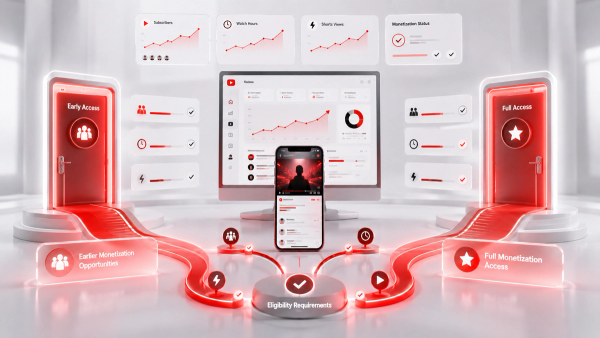
Monetization is a milestone, not the finish line. In 2026 the YouTube Partner Program has two tiers. The full tier requires 1,000 subscribers plus either 4,000 public watch hours in the last 12 months or 10 million Shorts views in the last 90 days, and it unlocks ad revenue on long-form, Shorts, and fan funding. The early-access tier requires 500 subscribers, 3 public uploads in the last 90 days, and either 3,000 watch hours or 3 million Shorts views, but it unlocks fan funding only (memberships, Super Thanks, and Super Chat), not ad revenue. Plan your entry path deliberately. The 4,000 watch-hours target is about a quarter of a million minutes, which a once-per-week channel clears in roughly 4 to 8 months if retention is decent. The Shorts route is faster for subscribers but slower for watch hours, which is why most faceless channels combine both. Expect a monetization review of around one month, and keep a clean record, because the 2025 demonetization wave taught creators that copy-paste, low-effort AI content and reused material gets rejected or removed. Read YouTube's monetization policies before you apply, not after a rejection.
Realistic Income Projections (Months 1-12)
Here is the honest year one for a typical faceless channel. Every figure is an estimate, and none of it is guaranteed.
- Months 1-3: $0 to $300 total. You are building the pipeline and often still below monetization.
- Months 4-6: $300 to $1,500. Early ad revenue, and the first sponsorship or affiliate results if the niche is strong.
- Months 9-12: $2,000-plus months start appearing for channels that found traction, though many stay lower.
The math underneath is simple. At a $5 RPM, $1,000 per month requires about 200,000 monetized views per month. At a $10 RPM, the same $1,000 needs about 100,000. Plug your niche's RPM and your view targets into the YouTube Money Calculator to see per-video, per-1,000-view, and annual estimates, and remember that ads are usually only 30 to 50 percent of a channel's income; affiliates, sponsorships, and products cover the rest. Expect 10 to 15 hours of work per week early on. The fully passive version arrives, if it does, after roughly a year, when you can outsource production and drop to 2 to 5 hours per week. Anyone selling you a channel that runs itself in month one is selling the myth, not the method.
Final Takeaway
Starting a faceless channel in 2026 is a pipeline problem, not a magic trick. Choose a niche where the RPM and your stamina both hold up, set the channel up properly, pick a format you can actually produce, and script for retention before you touch an editor. Publish on a cadence you can keep, clear the YPP thresholds with original work, and model your income with real numbers instead of guru screenshots. The estimate, not the promise, is the professional tool. Run your niche's RPM and your realistic view counts through the free Thumbix YouTube Money Calculator before you commit a single dollar to the project. Then make the first three videos, because shipping beats planning every single time.
Frequently Asked Questions
How long does a faceless YouTube channel take to monetize?
Most channels hit the YouTube Partner Program in 4 to 8 months (60 to 180 days) with consistent posting. The review itself takes about a month after you apply.
How much money can a faceless channel make in its first year?
Expect $0 to $300 in months 1 to 3, $300 to $1,500 in months 4 to 6, and $2,000-plus months from roughly month 9 onward if traction is strong. Income is never guaranteed.
Do I need to show my face to get monetized?
No. YouTube has no rule requiring your face, and thousands of monetized channels use voiceover, screen recordings, animation, and text-on-screen. Your content still needs to be original and follow monetization policies.
What is the best niche for a faceless channel?
There is no single best niche. Finance and tech pay the highest RPM ($5 to $20-plus), while motivation and nature pay the least ($2 to $5). Pick a topic you can research for the long haul.
How much does it cost to start a faceless channel?
A lean 90-day budget is about $300 in tools and stock. A quality setup runs closer to $1,500. Under $100 per month is enough to test a niche.
Can I use AI tools for a faceless channel?
Yes, but quality matters. The 2025 demonetization wave hit lazy copy-paste AI clone channels, so treat AI as an assistant for research, scripting, and visuals, and keep a human review step in everything you publish.
Are faceless channels fully passive?
Rarely at the start. Expect 10 to 15 hours per week early on, dropping to 2 to 5 hours per week after about 12 months once you can outsource production.
How many views do I need to make $1,000 a month?
At a $5 RPM, about 200,000 monetized views per month. At a $10 RPM, about 100,000. The YouTube Money Calculator works out your personal number.