Table of Contents
- Introduction
- The Rule That Changes Everything: Human Review
- Step 1: Research With AI, Decide With Data
- Step 2: Draft Scripts With AI, Rewrite Them Yourself
- Step 3: Voice and Visuals
- Step 4: Editing and Assembly
- Step 5: Packaging and SEO Checks
- Step 6: Quality Control Before You Publish
- Which Parts to Automate vs Keep Human
- The AI Tools Stack for Under $100 a Month
- Frequently Asked Questions
- Final Takeaway
AI can accelerate nearly every step of a faceless channel, but it cannot replace the human quality bar. Here is the realistic 2026 workflow: what to automate, what to keep human, and the packaging checks that keep you monetized.
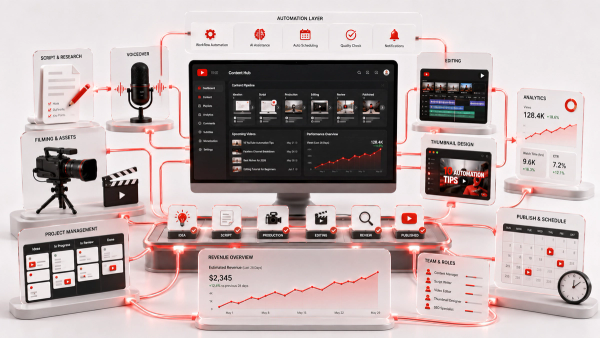
AI is now a standard part of the faceless channel toolkit, and in 2026 the question is no longer whether to use it, but how to use it without becoming one of the thousands of channels that got demonetized for low-effort AI content. The difference is never the tool; it is the pipeline around the tool. A faceless channel built with AI, where a human owns research verification, script quality, and final review, is a normal professional channel. A channel where AI produces and publishes with no human step is a content farm, and YouTube has shown exactly what happens to those. This guide walks through a realistic AI-assisted workflow across six steps, from research to packaging, then covers the quality checks that protect your channel and the free Thumbix tools that verify your packaging before you publish.
Introduction
Before the first tool, one honest note: AI does not remove the two hardest parts of a faceless channel, which are choosing a niche people want and writing scripts people finish. It accelerates everything around those two skills, and it removes the grunt work of production. Treat it as a production team that works fast but needs a supervisor, and you have the right mental model. The workflow below assumes you want a sustainable, monetizable channel, not a quick flood of uploads. Every step keeps a human in the loop, because that loop is what separates a channel with a future from a demonetized experiment. The tools mentioned are categories rather than specific products, because the good ones change every quarter; the principles do not.
The Rule That Changes Everything: Human Review
If you remember only one thing from this article, remember this: every video must pass a human quality review before it goes live. That review checks three things, in order. First, accuracy. AI drafts confidently include confident errors, and in niches like finance, tech, and history a factual mistake is not a typo; it is a credibility killer and a monetization risk. Second, originality. YouTube's monetization policies require original content, and a script that is a stitched paraphrase of other channels is reused content, regardless of which tool produced it. Third, quality. Would you show this video to a client as your professional work? If not, it does not publish. This review step is also your defense against the demonetization wave that hit lazy AI clone channels in 2025. YouTube does not ban AI; it bans low-effort, inauthentic content. A human review step is the clearest evidence that your channel is neither.
Step 1: Research With AI, Decide With Data
AI is genuinely excellent at research, and this is where it saves you the most time. Use an AI assistant to generate topic candidates for your niche, build question lists from comments and search suggestions, and summarize what the top videos in your niche actually cover. The discipline is verification. AI-generated topic ideas are hypotheses, not facts, so check each one against real data before committing. Which videos in your niche already get views? What do the comments ask for repeatedly? What gaps do the top ten results share? A topic that AI suggests and data confirms is a good topic; a topic that only AI suggests is a gamble. Keep a running list of vetted topics with a one-line angle for each. By the time you have thirty, you will know your channel's lane, and you will never stare at a blank page on upload day.
Step 2: Draft Scripts With AI, Rewrite Them Yourself
AI produces excellent first drafts and poor final scripts. The reason is simple: AI writes for tone, not for your specific audience, and it has no sense of your channel's pacing or your voice. Use it to beat the blank page, then make the script yours. A strong process is to feed the AI your vetted topic and ask for an outline with a clear hook, three to five segments, and a payoff. Turn that outline into the first draft yourself, because your phrasing and examples are what make it original. Use the AI to punch up transitions or suggest simpler ways to explain a concept. Then read the whole script aloud, which catches the robotic sentences that no editor flags. The retention structure matters more than the prose: open with the payoff in the first 30 seconds, end every segment with a reason to keep watching, and cut anything that does not move the story forward. This is the same discipline any successful channel follows; AI just gets you to the draft faster.
Step 3: Voice and Visuals
For voice, you have two legitimate options. A human voiceover gives you natural delivery and is safest for trust-heavy niches like finance and health, and it is a modest cost if you outsource it. High-quality text-to-speech has improved dramatically and is acceptable in many faceless niches, but it needs careful tuning of pacing and emphasis, and it is the single most recognizable marker of a low-effort AI channel when done badly. If you use AI voice, treat the delivery as part of the edit. Adjust pauses, stress, and sentence rhythm in your script so the narration sounds like a person explaining, not a system reading. A monotone AI voice over generic stock footage is precisely the combination that gets channels flagged. For visuals, use AI image generation for thumbnails and occasional graphics, but rely on real stock footage or your own screen recordings for the body of most videos. Audiences can smell generic AI imagery, and in 2026 the polish of the visuals is part of the quality bar.
Step 4: Editing and Assembly
Editing is where AI offers the least dramatic savings and where quality matters most. Do not publish a video you did not watch end to end. Automated assembly tools can cut rough versions and generate captions, which saves hours, but the pacing, the sound design, and the story beats still need a human. The practical division of labor: let AI assemble a rough cut from your script markers, generate captions, and remove silences. You handle the creative decisions, choosing which shots carry each line, where the music breathes, and where you cut hard for emphasis. If you outsource the edit, brief it tightly with timestamps, then review the full result. Captions deserve special attention. On long-form, accurate captions lift watch time for muted viewers and make videos accessible. On Shorts, captions are effectively the script itself, because most viewers watch without sound.
Step 5: Packaging and SEO Checks
Packaging is the smallest part of the work and the largest part of the click-through rate, so verify it instead of guessing. The YouTube Title Length Checker tells you whether your title fits YouTube's limits and where it will truncate in results, which matters more than it sounds. The Keyword Density Checker shows whether your title, description, and script actually repeat your target phrase enough to signal relevance without stuffing. Write the title as a search query a viewer would type, then as a promise you can keep. Write the description's first two lines as a mini-article, because they appear in search results. And draft the thumbnail with one clear focal subject, readable text, and a strong color contrast; AI image generation is a fine starting point for the visual, but a human decides whether it actually communicates the video's promise. If the video is a Short, the packaging rules sharpen further. The first line of the description is what viewers see, and captions carry most of the load, which is where the Shorts Caption Formatter helps you format captions in short, readable lines instead of blocks of text.
Step 6: Quality Control Before You Publish
Publishing is the point of no return, so run a checklist before you hit upload. Verify every factual claim in the script and the description. Watch the full video on mute, then with sound, and note where you lost attention. Confirm the title, description, and thumbnail all say the same thing. Check that nothing in the video violates monetization policies, especially in sensitive niches. Then ask the review question honestly: is this the standard you would show a client? If a video does not pass, it does not publish. Posting a weak video to keep a schedule is how channels train their audiences to leave, and it is exactly how AI-assisted channels drift toward the demonetized pile. This checklist is also the perfect place to involve a second pair of eyes. A regular reviewer who catches one sloppy claim a month is cheaper than a single policy strike.
Which Parts to Automate vs Keep Human
By now the pattern is clear, so here it is as a rule of thumb. Automate the volume work: topic generation, outline drafting, transcription, captions, image ideation, and rough-cut assembly. These are time sinks with low creative risk, and AI does them well. Keep human the judgment work: topic selection and verification, the final script, factual review, pacing decisions, the thumbnail decision, and the policy check. These are where credibility, originality, and monetization live, and delegating them to AI is how channels get demonetized. The test for any step is simple: if a mistake there would cost you trust or a policy strike, a human owns it. If it would merely cost you time, AI can own it.
The AI Tools Stack for Under $100 a Month
A complete AI-assisted stack is affordable. For under $100 a month in 2026 you can cover research (an AI assistant), voiceover (either a subscription text-to-speech or occasional human voice gigs), visuals (stock library plus an AI image generator), editing (a standard editor with AI captioning), and packaging (the free Thumbix checks). The budget question is where to spend. Spend on the voice and the stock library, because those two are visible in every second of every video. Save on novelty AI features that add polish but no retention. And remember that the $30 to $100 per month tools range is the automation baseline; freelance editing or voice adds real cost on top, so model per-video economics before you scale.
Final Takeaway
AI tools are the accelerator, not the author, of a successful faceless channel in 2026. Use them to research topics, draft scripts, generate captions, and create visuals, then keep the human in charge of the three things that actually decide your future: factual accuracy, original scripting, and a final quality review before every publish. That loop is the entire difference between a professional AI-assisted channel and a demonetized content farm. And remember that packaging is part of the job. Before you publish, run your title through the free Thumbix YouTube Title Length Checker and the Keyword Density Checker, and format any Shorts captions with the Shorts Caption Formatter. Verification is the part of AI workflows that AI cannot do for you.
Frequently Asked Questions
Can I create a faceless YouTube channel with AI?
Yes. AI can assist research, scripting, voiceover, visuals, editing, and packaging. The requirement is a human review step, because YouTube demonetizes low-effort, inauthentic content, not AI itself.
Does YouTube demonetize AI content?
YouTube monetizes original, quality content regardless of the tools used. It demonetizes lazy copy-paste AI clone channels, reused content, and anything that fails monetization policies, which is why human review matters.
What AI tools do faceless channels use?
Typical stacks cover research, script drafting, text-to-speech voice, stock visuals, caption generation, and image-based thumbnails, usually for under $100 a month.
How do I avoid getting demonetized while using AI?
Verify every claim, rewrite AI drafts so the script is original, watch the full edit, and review each video against monetization policies before publishing. Never publish un-reviewed AI output.
Is AI voiceover okay for faceless channels?
Yes, in most niches, when tuned well. Monotone, untuned text-to-speech over generic footage is a marker of low-effort channels, so pace and emphasize like a person.
What should I never automate?
Topic selection and verification, the final script, factual review, pacing decisions, the thumbnail decision, and the policy check. These carry trust and monetization risk.
How much does an AI tools stack cost?
A full stack runs about $30 to $100 per month. Spend on voice and visuals, since those are visible in every second of every video.
How do I check my packaging before publishing?
Use the YouTube Title Length Checker and Keyword Density Checker for search readiness, and the Shorts Caption Formatter to format readable captions for vertical video.